v1.0.0 · free forever · no account

Roblox Unlocker
Lifts the FPS cap.

The frame rate limiter in Roblox is hardcoded to 60 FPS by default — even if your PC can handle more. Roblox Unlocker writes a single FastFlag that tells the engine to push as high as your hardware allows. Your account, game files, and purchases never change.

Never touches your accountFully reversible in one clickCompletely free for Windows 10/11v1.0.0
Uncaps 60 FPS limitResets in one clickAccount untouchedShort installerFour tuned presets
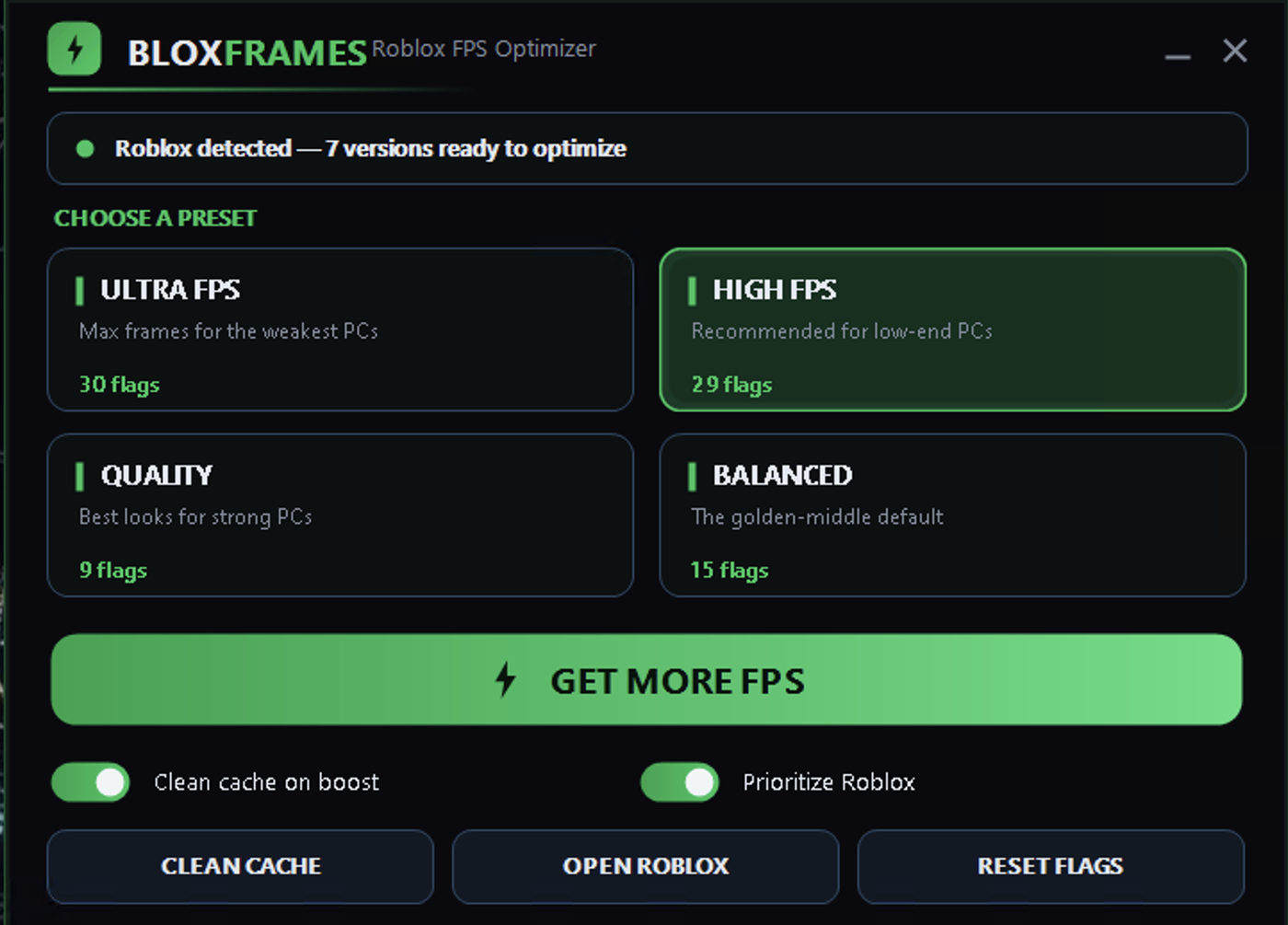
Roblox Unlocker app window on Windows
Get started

Apply a preset in three steps.

Installation and first boost take about one minute.

How it looks
Inside the appRoblox Unlocker window

Frame rate climbs the moment you launch the game.

Roblox Unlocker writes the same performance flags that Roblox already recognizes internally. The moment you boot the game after applying a preset, the frame counter stops capping at 60 and climbs toward your monitor's refresh rate or your GPU's actual limit. The effect is immediate and doesn't require restarting your PC.

Ultra FPS presetTargets rigs that can push 144+ frames by turning off shadows, post-processing and MSAA, then switches to Vulkan for raw throughput.
High FPS presetBalances quality and speed on mid-range hardware, keeping textures and lighting sharp while uncapping the frame rate.
Cache cleanupPurges Roblox logs, temp files and cached assets in the background, freeing memory that could otherwise clog frame pacing.
vs. browser tools

How Roblox Unlocker differs from online tools.

Most frame-rate "unlockers" are websites or browser extensions that claim to boost FPS — but they can't. Roblox Unlocker is a Windows app that actually changes what Roblox reads.

Where it runs
Your PC, offline
Browser only
What it touches
Config file only
Can't access game files
FPS result
Real boost to frame rate
No effect on actual FPS
Stays applied
Until you reset it
Lost on browser refresh
Works offline
Yes, one-time setup
Needs internet every session
Your data
Never leaves your PC
Sent to third-party server
What stays safe

What actually changes — and what doesn't.

Roblox Unlocker touches only performance settings. Everything else stays exactly as it was.

FPS cap lifts

The TaskScheduler target-FPS flag is the only value the unlocker writes that Roblox reads at startup. It tells the engine to render at your monitor's speed instead of locking to 60. You can set it to 144, 240, 360 or unlimited.

Account is untouched

Roblox Unlocker never touches your login, session tokens, or account settings. You log in the same way, your username is the same, and Roblox servers see no difference in your traffic.

Game files stay intact

No game code is modified, no DLLs are injected, and no memory is patched. The unlocker only writes to Roblox's own ClientAppSettings.json config file — the same place Bloxstrap and the FastFlag community write to.

Purchases work normally

Your Robux balance, game passes, and cosmetic purchases are server-side and have nothing to do with performance flags. Buying, selling and equipping items works exactly as before.

You asked

Common questions about the unlocker.

Will this get me banned?

Roblox Unlocker writes flags to a config file that Roblox's own launcher reads at startup — the same method that Bloxstrap uses. It doesn't inject code, patch memory, or alter the game client. Whether Roblox allows frame-rate unlockers is Roblox's decision, not ours; you should check the game's terms before using any optimization tool.

Can I undo the boost?

Yes. The Reset Flags button removes every value Roblox Unlocker wrote and restores Roblox to its default settings in one click. You can toggle presets on and off as many times as you want.

Does it work on my laptop?

Roblox Unlocker runs on Windows 10 and Windows 11. If your laptop can run Roblox at 30+ FPS, a preset like High FPS or Balanced will help smooth out performance. Ultra FPS is built for rigs with stronger GPUs.

What if I have multiple Roblox versions installed?

Roblox Unlocker detects every Roblox version on your PC and applies the preset to all of them in a single pass. If you later uninstall a version, the next time you run the unlocker it will skip folders that no longer exist.

How much FPS will I gain?

It depends on your hardware and which preset you choose. Ultra FPS can push 144+ on a mid-range GPU if the game is not heavily loaded. In a crowded server or during a raid, you'll see a smaller jump but steadier frame pacing overall.

Does it use my CPU or GPU?

Roblox Unlocker bumps the Roblox process to High priority on your CPU, which helps with frame pacing when other apps are running. The presets also let you switch render backends — Vulkan for GPU throughput, Direct3D11 for stability — depending on which hardware bottleneck you want to fix.

Is it really free?

Roblox Unlocker is free to download and free to use. The source code is open on GitHub if you want to check how it works.
Stop hitting the 60 FPS wall.

Roblox Unlocker is a one-minute setup that your PC keeps applying every time you launch the game.

Download for Windows
Latest release · v1.0.0

Roblox Unlocker guides